
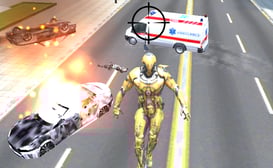
Sandbox City
- Разработчик
- Yilmaz Kiymaz
- Рейтинг
- 8,9(за последние 6 месяцев)
- Голоса
- 483 тыс. лайки и 54 тыс. дизлайки
- Выпущено
- декабрь 2021 г.
- Последнее обновление
- август 2026 г.
- Игровой движок
- Unity 6
- Платформы
- Браузер (настольный компьютер, мобильное устройство, планшет), App Store (iOS, Android, MSN)
- Ориентация
- Альбомная / Книжная ориентация
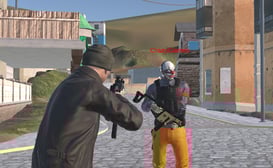
Sandbox City — это симулятор-хоррор в жанре «песочница», где вы бродите по городу, захваченному зомби. Вы можете водить машины, сражаться с врагами с помощью оружия, выполнять миссии за деньги и многое другое, стараясь при этом избегать голодных зомби. Это реалистичная игра с физикой, элементами «тряпичной куклы», замедленной съемкой и множеством напряженных моментов.
Как играть в Sandbox City
Игра начинается с того, что ваш персонаж и аксессуары готовы к настройке. Это ваша база перед началом игрового процесса.
Начните с настройки своего персонажа или автомобиля, используя две кнопки «Настроить», или откройте «Миссии», «Магазин» или «Настройки» в правом верхнем углу. Также стоит ознакомиться с полным списком элементов управления на этом экране, который включает вкладки для клавиатуры, контроллера Xbox и контроллера PS. Игра также поддерживает контроллеры Xbox и PlayStation.
Когда будете готовы, нажмите «Играть», чтобы войти в город.
При первом нажатии кнопки «Играть» Парень, выполняющий задания, проводит вас через короткое вступление. Он приветствует вас в Городе-песочнице, предупреждает, что зомби разгуливают на свободе и жители в опасности, указывает на магазин, где вы можете вооружиться, и просит вас найти его для выполнения заданий. Следуйте за маркером на экране (он показывает расстояние, например, «Поговорить с Парнем, выполняющим задания, 114 м»), чтобы добраться до него и начать зарабатывать.
Исследование города
Оказавшись в игровом мире, вы увидите на своем HUD-интерфейсе показатели здоровья, денег и текущего оружия. Вот несколько моментов, на которые стоит обратить внимание:
- Сброс грузов : Деревянные ящики разбросаны по городу. Разбейте их, чтобы подобрать груз.
- Наличные : Забирайте деньги во время исследования локаций, чтобы пополнить свой баланс.
- Автомобили : подойдите к транспортному средству и нажмите клавишу E, чтобы сесть. Нажмите клавишу E еще раз, чтобы выйти.
- Метро : Вы можете использовать метро для передвижения по городу (это также ежедневное задание).
- Купить дом : Следите за зданием «Купить дом». Вход в ваш дом — это задание кампании, за выполнение которого выплачивается 1000 наличных.
Миссии
Нажмите клавишу M или коснитесь значка «Задания», чтобы открыть две вкладки:
- Кампания : Сюжетные миссии, такие как «Поговори с парнем из миссии» (50 наличных) и «Войди в дом» (1000 наличных).
- Ежедневные задания : сменяющиеся задания, которые обновляются каждые 24 часа, например, убить 6 зомби из пистолета (100 монет), убить 6 зомби из холодного оружия (150 монет) и один раз воспользоваться метро (100 монет). Также есть ежедневная награда в размере 500 монет, которую можно получить каждый день.
Выполнение заданий — ваш основной источник дохода, поэтому заходите сюда ежедневно.
Магазин
Нажмите клавишу P или коснитесь значка «Магазин». Он организован по вкладкам:
- В числе особенностей : отключение рекламы, бесплатные ежедневные патроны и ярлыки для настройки.
- Оружие : холодное оружие, такое как бейсбольная бита и теннисная ракетка (по 50 монет каждая), а также граната (250), MP-40 (500) и штурмовая винтовка (500). Большинство видов оружия также можно разблокировать со скидкой, посмотрев рекламу.
- Боеприпасы : Бесплатный ежедневный набор из 50 патронов каждые 24 часа, а также наборы патронов малого размера (100 патронов), большого размера (300 патронов) и снайперские наборы.
- Усиления : Временные 2-минутные бонусы: Ускорение, Множитель заработанных денег (удваивает количество подобранных предметов) и Усиление здоровья (увеличивает максимальное здоровье до 150). Каждое стоит 500 монет или рекламу.
- Деньги : денежные пакеты, включая бесплатные 250 монет за просмотр рекламы.
- Настройка : Быстрый доступ к настройке персонажа и автомобиля.
Настройка
Персонаж: Выберите один из 28 скинов (каждый с несколькими вариантами материалов), затем нарядите его с помощью головных уборов и шлемов, масок, причесок, лиц и рюкзаков. В игре более 100 аксессуаров, каждый из которых стоит 500 внутриигровой валюты, или 100, если вы посмотрите рекламу.
Автомобиль: Выберите свой автомобиль (например, маслкар), затем измените цвет кузова, колеса и другие детали.
Настройки
Перед началом игры стоит взглянуть на неё. Вы можете настроить язык, размер интерфейса, качество графики (или позволить игре автоматически определить идеальные настройки), чувствительность камеры, музыку и звук. Две из них особенно выделяются:
- Замедленная съемка после столкновения : Включает кинематографическую замедленную съемку при столкновении.
- Отключить зомби : Полностью отключает зомби, если вы предпочитаете спокойно передвигаться по городу.
Советы
- Получайте бесплатные бонусы ежедневно. Бесплатные ежедневные боеприпасы, ежедневная награда и ежедневные задания быстро накапливаются.
- Улучшайте своё оружие. Бейсбольная бита и теннисная ракетка стоят всего 50 монет, а за выполнение ежедневного задания по ближнему бою платят больше, чем за задание с оружием.
Больше игр, подобных этой
Если вы жаждете приключений, попробуйте такие игры, как House of Hazards , Getting Over It или Getaway Shootout — гарантированное удовольствие!
Дата выпуска
- Ноябрь 2020 г. (Android)
- Июль 2021 г. (iOS)
- Декабрь 2021 г. (WebGL)
Разработчик
Йылмаз Киймаз создал Sandbox City - Cars, Zombies, Ragdolls!.
Платформы
- Веб-браузер
- Android
- iOS
Последнее обновление
21 авг. 2026 г.
Элементы управления
- Клавиши WASD или стрелки = перемещение
- Левая кнопка мыши = атака. Удерживайте для стрельбы.
- Удерживайте клавишу Shift = бег
- Пробел = прыжок при ходьбе, ручной тормоз при движении на автомобиле.
- E = войти/выйти из машины, купить товары
- R = переключение между оружием
- T = вход и выход из режима замедленной съемки
- L = блокировка/разблокировка курсора мыши
- C = изменить ракурс камеры
- Esc = выйти
Игровое видео